Asset sources
Guide images and tools are hosted under guides/assets/. SHA256SUMS lists their checksums.
| File | Source |
|---|---|
images/tc1-ota-*.png, images/tc1-stock-*.png, images/tc1-community-ap.png |
User-provided no-disassembly flashing screenshots, cropped to key router, network, TFTP, stock identity and first-boot areas |
tools/tc1-no-disassembly/mico_ota.bin |
The same validated image snapshot as the parent guide (raw image SHA-256: 005b5c4d8a1bb4e70b1b6aa84f1c403e648d3c2d4d683a067a22193543050735) plus its 16-byte binary MD5; fixed 0.9.6-ed4474 migration image; install the current TC1 release after migration |
tools/daikin-stock-ota/daikin-bry88ab.application.bin |
Legacy 0.9.21-2cfd89-dirty snapshot; retained for old links. The current guide downloads the latest compatible native application from the release catalog |
tools/tc1-no-disassembly/tftp-trigger.bin |
397-byte trigger generated from the parent guide, only for TC1 A1 stock 1.0.0.26, not a general firmware update package |
images/emw3080-pins.png |
MXCHIP EMW3080 pin diagram; original content retained, transparent background changed to white |
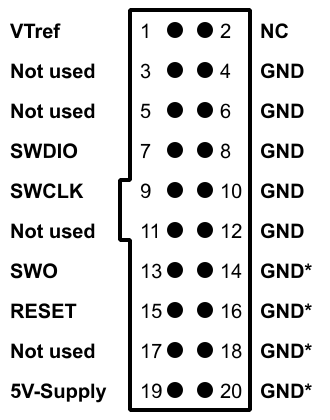
images/emw3080-swd-pins.png |
SWD pin diagram from the official EMW3080 flashing guide |
images/tc1-a1-module.png, images/tc1-a1-test-points.png |
User-provided annotated TC1 A1 module / factory test-point images |
images/a1-jlink-points.png |
User-provided corrected A1 J-Link wiring photo (DIO above CLK) |
images/m1-scd40-wiring.png |
User-provided M1 / SCD40 wiring photo; handwritten 7 / 8 are GPIO signal names |
tools/emw3080-openocd.zip, tools/emw3080-openocd/ |
Project Python 3 validation, splitting and flashing helper with modern MX1290 configuration; no third-party binaries or firmware. Requires the matching programmer and script from the original zA1 package |
images/jlink-swd.png |
Official SEGGER SWD diagram, converted to PNG on white |
images/flashplus-config.png |
Configuration crop from page 2 of the EMW3031 / FlashPlus manual. Used only for chip / Flash identification; use this project's erase and verification instructions |
tools/FlashPlus_v1.0.10.msi |
Marvell FlashPlus v1.0.10 from the IoTDevice mirror, unmodified installer |
tools/a1-easylink.zip |
Project-owned A1 EasyLink tools: tools/a1_easylink.py, tools/a1_easylink_web.py and three web assets; no firmware included; archive checksum in SHA256SUMS |
tools/easylink-linux/easylink_v2_linux.c |
Project Linux mac80211 injection tool, derived from the EasyLink V2 sender used successfully with a physical M1; A1 uses the same protocol. Ordinary UDP tools remain experimental |
tools/a1-dns-migration/a1_dns_migration.py |
Derived from A1 stock v1.47 update domains, HTTPS requests, top-level JSON, version comparison and download verification; DNS migration awaits device validation |

Images and third-party tools remain copyrighted by their authors and vendors; hosting copies does not change their licenses. FlashPlus is not part of this project's firmware source. The EMW3031 datasheet restricts reproduction of its illustrations, so the guide links to it instead.
Operating notes
The A1 filter and power interlock note comes from zA1 Issue #3. Users reported that the purifier would not power on without its filter; the original project maintainer confirmed adding the reminder to the documentation.
See Build dependencies for toolchains and SDKs.
DAIKIN and measurement references
DAIKIN wiring and PM2005 / PM2105 frames follow louliangsheng/daikin-air-sensor. PM2.5 and PM10 occupy different fields in the same reply. TVOC uses SGP30 native ppb output. The ≤300 ppb product ventilation reference matches the device indicator; see the Sensirion SGP30 datasheet and MOX output explanation. It is not a health compliance limit. Particulate display bands follow HJ 633—2026 table 3; instantaneous readings are not a calculated AQI.