M1 operation
M1 provides PM2.5, formaldehyde, temperature, humidity and screen brightness controls. It can supply readings for A1 automation. This page covers daily use after installation. For first installation, see factory LAN migration or wired flashing and recovery.
Controller compatibility: the GPL-3.0 open-source controller is recommended for stock 11.x. Stock 17.1.2.3 / 17.x differs substantially and awaits analysis; migration is discouraged. Check Wi-Fi and controller versions separately. Unreadable versions remain unknown.
On this page
Two separate firmware updates
M1 has a Wi-Fi MCU (EMW3080) for networking and the web interface, and a sensor controller (ATSAMD20G18A) for built-in sensors, the screen and buzzer. An ordinary web update installs Wi-Fi firmware only. Choose the latest compatible stable release for everyday use; RC builds are for beta testing. v1.0.0 features require matching Wi-Fi firmware, frontend and sensor controller; see the latest release notes for available versions. Wi-Fi firmware and the controller are downloaded and updated separately. Dual-region user readings, double-click actions and PM2.5 smoothing need matching versions. Basic readings remain usable with the stock controller. Older tones/music require controller v0.9.3 or newer; particle details require v0.9.4 complete-frame capabilities.
To reduce accidental wrong-image flashing, there is no controller upload button in the WebUI. Use the computer script through the API for that separate update. See controller features and version requirements.
Readings
The home page shows particle concentration (PM2.5), formaldehyde concentration, ambient temperature and relative humidity. Colors and labels indicate reading quality, such as excellent, good or poor.
Particle details
With a sensor controller that supports complete frames (published in controller v0.9.4), the local home page provides a Particle details card: PM1.0, PM10 and six cumulative particle counts. PM2.5 stays in its main card. Expand details for CF=1 concentrations and raw diagnostics. Counts use particles per 0.1 L, not μg/m³; atmospheric and CF=1 are two reporting conventions from the same sensor.
Expired, warming-up or unhealthy measurements show “—”. If the card is absent or unsupported, check both firmware versions and controller capabilities. The new readings support MQTT and Home Assistant discovery. See complete-frame readings.
External SCD40 CO₂ sensor (experimental)
Test firmware with SCD40 support reads CO₂ over I²C. After sensor identification, the home page displays CO₂ in ppm. A newly opened page hides the card until a valid reading arrives, including when the sensor data is already expired. If a reading expires after a valid value was displayed, the card retains the last valid value from this page session in gray with an “Outdated” label. Before the first valid reading, it shows “—”. Reloading clears this cache. Original temperature and humidity readings still come from M1's built-in sensor.
Matching firmware uses actual station pressure from a detected BMP388 / BMP390 barometer to compensate SCD40 CO₂. Pressure must be within 700–1200 hPa and no more than ten seconds old; absent, expired or out-of-range pressure falls back to 1013 hPa. Do not substitute sea-level-corrected weather pressure for station pressure. This compensates CO₂ only: temperature and humidity still come from M1's built-in sensor, with no additional SCD40 temperature or humidity entities.
This feature is for experimental firmware; continuous sampling may stop.
Disconnect power and identify solder points on the actual board. These are SDK GPIO names, not connector pin numbers:
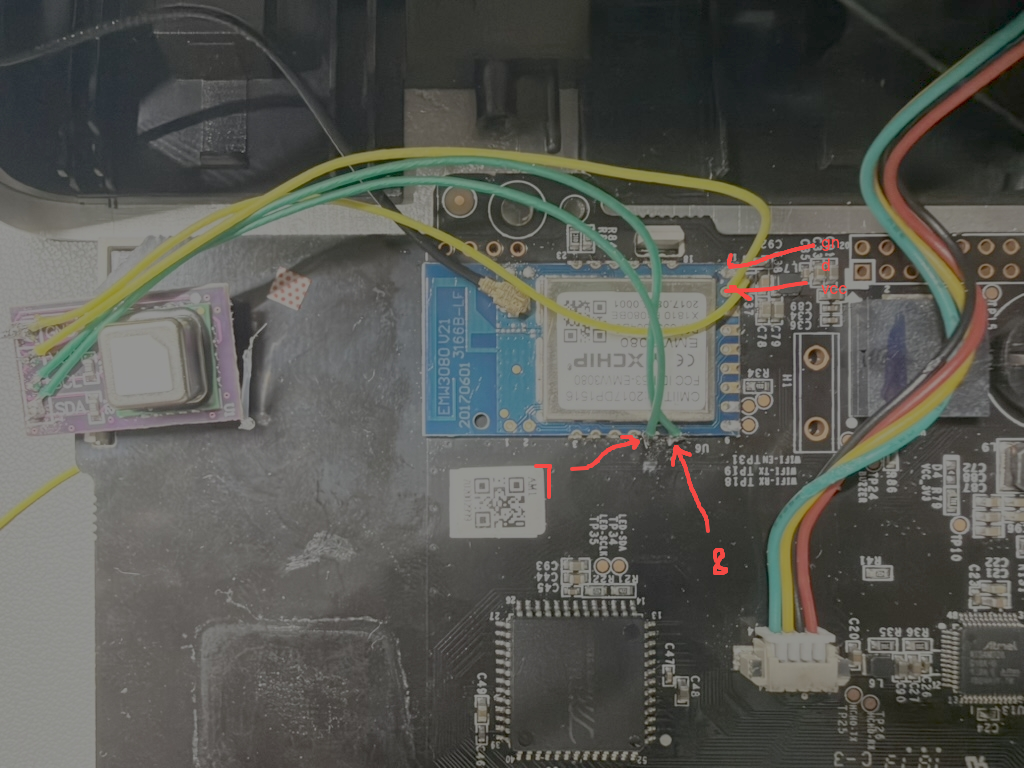
The handwritten 7 / 8 mean GPIO7 / GPIO8, corresponding to SCL / SDA below, not module physical pin numbers. GND / VCC arrows locate the supply pads; confirm voltage and polarity on your board before connecting.
| M1 signal | SCD40 module |
|---|---|
| GPIO8 (I²C1 SDA) | SDA |
| GPIO7 (I²C1 SCL) | SCL |
| Stable supply matching the module rating | VCC / VIN |
| GND | GND |
Pull SDA and SCL up separately to 3.3 V. Start with 4.7 kΩ for short wires; existing 10 kΩ pull-ups to 3.3 V can be tried first. Check the pull-up supply; do not pull M1's bus to 5 V. Keep wires short and provide a supply that handles measurement current peaks, never GPIO power. GPIO9 / GPIO10 are used by the original UART.
References: Sensirion SCD40 and official developer and power guidance.
Screen brightness
Set brightness in the WebUI; the device saves and acknowledges it. MQTT commands can also change brightness, and the device reports the accepted setting when an independent MQTT client changes it.
Wi-Fi and error icons
The original panel has two independent icon outputs:
| State | Wi-Fi icon | Error icon |
|---|---|---|
| Normal | Steady on | Off |
| Wi-Fi fault | Blinking | Blinking |
| Configured MQTT fault | Steady on | Two long and two short pulses |
Disabling an output drives its GPIO low. An unconfigured MQTT connection is not a fault. The stock controller has no verified general protocol for formaldehyde / PM2.5 color thresholds or manual colors. See the open-source controller guide for its extensions.
Buttons and recovery
After updating both the open-source sensor MCU and Wi-Fi firmware to versions supporting staged recovery:
- A single click toggles the screen after about 350 ms to distinguish a double click. While an alarm is ringing, a double click only stops it. Otherwise, it switches both original/user readings according to the configured action.
- Hold for at least 3 seconds and release before 10 seconds to clear Wi-Fi and the WebUI password and start provisioning again. MQTT and other settings are preserved.
- Hold continuously for 10 seconds to restore factory settings, including Wi-Fi, MQTT, the WebUI password and other network-module settings. Custom music stored separately on the sensor MCU is preserved.
Both recovery actions save settings before restarting the sensor and Wi-Fi MCUs; Wi-Fi connectivity is not required. Recovery gestures are disabled during updates. Stock sensor firmware retains its original long-press provisioning event and does not support these staged gestures. See M1 wired recovery; a full reset is also available in the WebUI.
The current EMW3080 SDK does not provide WPA3 connectivity. Use WPA2-PSK/AES; WPA2/WPA3 transition networks must allow WPA2 clients. See the module specifications.
Supplying readings to A1
M1 measures, reports and answers authorized A1 requests. It does not control or poll the purifier. Add this M1's MAC and optional IP on A1. MQTT establishes the session; sensor queries use LAN UDP. The M1 page shows read-only session status for up to four A1 units, with no allowlist or pairing code to maintain. See A1 sensor automation.
IoTCloud and Home Assistant
IoTCloud reuses the M1 CO₂ detail card and shows fresh CO₂ readings in device summaries. Once SCD40 produces a valid reading, Home Assistant discovers a carbon dioxide MQTT sensor in ppm. After 20 seconds without an update, only that sensor becomes unavailable; the original M1 sensors remain independent.
MQTT
M1 uses TMCP (v2) topics only, with no Legacy selector. See MQTT and automation.
v1 candidates: user readings and PM2.5 smoothing
The v1 candidates provide dual-position screen readings and steadier PM2.5. They require matching open-source controller, Wi-Fi firmware and frontend.
In Device settings, open User readings on the device screen. Configure the formaldehyde and PM2.5 regions separately using this M1's sensors, another device on the same MQTT account and broker (TC1 power, A1 main-fan output, DAIKIN CO₂ or other readings), or an API / manual write. A1 provides its current effective output percentage (0–100%), including fresh-air variants. Other devices' MAC addresses accept both aabbccddeeff and aa:bb:cc:dd:ee:ff, with either letter case.
RC5 source configuration: devices publish retained metadata and non-retained live state snapshots as MessagePack schema 3. M1 display-profile schema 4 binds device ID, field ID, number type and unit; names are labels. Missing, invalid or mismatched readings fall back while preserving the binding. See device interfaces and protocols for formats and examples.
Each region has three digits. The PM2.5 region supports integers only, rounded to the nearest integer and capped at 999; positive overflow also shows 999. The formaldehyde region has a fixed decimal point after the first digit, with five display modes. These conversions apply only to local / MQTT readings:
| Display mode | Rule and example | Display limit |
|---|---|---|
| Integer | Round to the nearest integer: 123.6 → 124 |
999 |
| Automatic kilo scaling | Below 1000, show an integer; from 1000, divide by 1000: 1234 → 1.23 |
9.99 after scaling |
| Two decimal places | Fixed x.xx: 1.234 → 1.23 |
9.99 |
| One decimal place, trailing zero | Fixed x.x0: 1.26 → 1.30 |
9.90 |
| Always divide by 1000 | Divide by 1000 and show x.xx: 1234 → 1.23 |
9.99 |
Positive overflow stays at the display limit. The original “甲醛” / “PM2.5” label and each region's unit can be shown or hidden independently. The formaldehyde region has mg/m³; the PM2.5 region has µg/m³. The screen cannot display arbitrary text or other units such as ppm, W or %. Choose whether to retain the original label and unit according to the external data's meaning.
The panel glass has the following 19 groups, with PM2.5 on the left and formaldehyde on the right. Each 8 indicates a digit position.
| No. | Position | Digits or symbol |
|---|---|---|
| 1 | Top left | Date 8888-88-88, including hyphens |
| 2 | Top, just right of center | Time 88:88, including the colon |
| 3 | Far top right | Wi-Fi icon and × |
| 4 | Above the middle-left digits | “PM2.5” label |
| 5 | Middle left | PM2.5 digits 888 |
| 6 | To the right of the middle-left digits | µg/m³ unit |
| 7 | Above the middle-right digits | “甲醛” (formaldehyde) label |
| 8 | Middle right | Formaldehyde digits 8.88, including the fixed decimal point |
| 9 | To the right of the middle-right digits | mg/m³ unit |
| 10 | Lower left | Horizontal color bar with rounded corners for PM2.5 status |
| 11 | Lower right | Horizontal color bar with rounded corners for formaldehyde status |
| 12 | Bottom-left corner | Thermometer icon |
| 13 | Lower left | “温度” (temperature) label |
| 14 | Lower left, toward the right | Temperature digits 88.8, including the decimal point |
| 15 | To the right of the temperature digits | °C unit |
| 16 | Lower right | Water-drop icon |
| 17 | Lower right, toward the center | “湿度” (humidity) label |
| 18 | Lower right, toward the right edge | Humidity digits 88.8, including the decimal point |
| 19 | Bottom-right corner | % unit |
Items 10 and 11 are the PM2.5 and formaldehyde status bars respectively. Each region has left, middle and right lamp positions. The red, green and yellow segments at every position switch independently, giving 9 segments per region; multiple colors can be on at the same position. Alternatively, set two color thresholds using the original physical value before conversion: green below the lower threshold, yellow from the lower threshold, and red from the upper threshold.
After selecting and saving the API / manual source, write an integer from 0–999, the decimal-point flag, original label and unit flags, and all 9 lamp segments directly. In the formaldehyde region, number 123 with the decimal point enabled shows 1.23; the PM2.5 region rejects the decimal-point flag. API writes do not apply the display modes or color thresholds above. Fractional numbers and numbers above 999 are rejected. Written values expire and need periodic updates. See the display API developer documentation for the complete fields and calls.
Set Double-press action to Switch both original/user readings to switch the pair together. A ringing alarm is stopped first. Set each region's maximum reading age independently: missing, expired, offline or invalid data restores only that region's original reading, without affecting the other. User readings do not replace original sensor acquisition or alarms.
Formaldehyde and PM2.5 have separate over-threshold buzzer switches, both off by default. Light thresholds, alarms and manual tones remain separately controlled.